Vyapar Blog Migration Case Study: Headless WordPress + Next.js + Cloudflare
Avinash Chandran · SEO Specialist
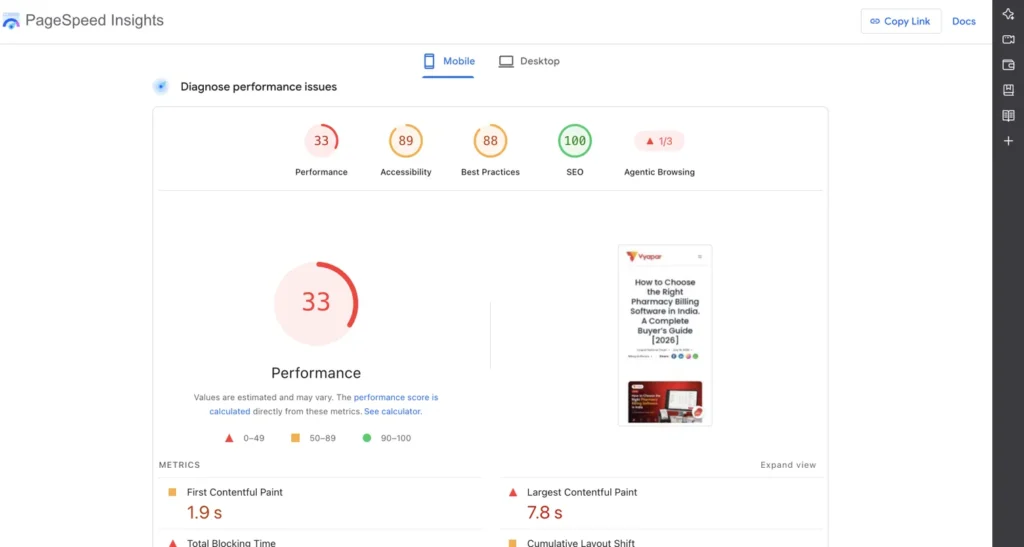
Vyapar’s blog was running on traditional WordPress. Fully server-rendered, every page request hitting the WP server, and a mobile Performance score of 33 on PageSpeed Insights. LCP was sitting at 7.8 seconds.
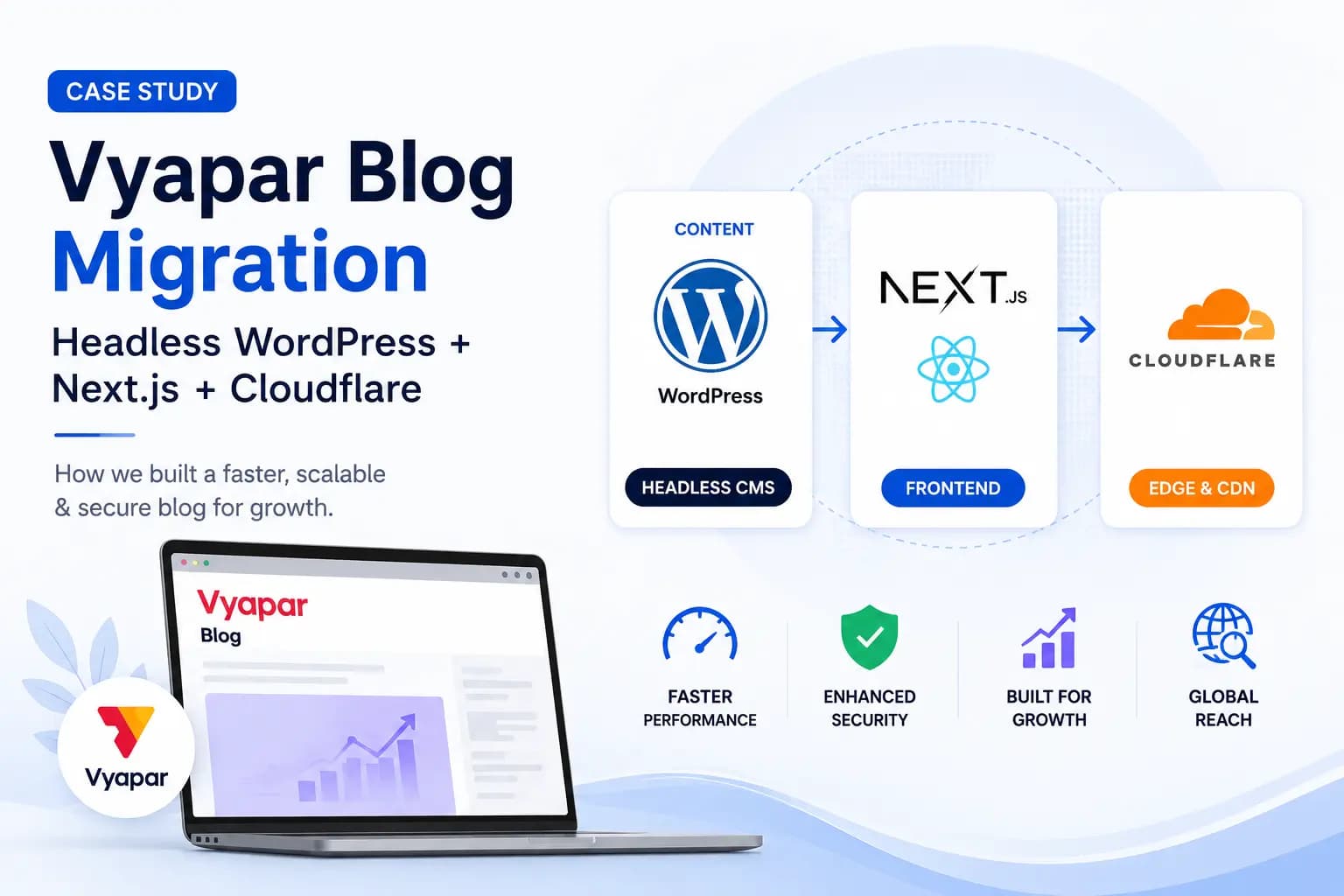
I owned the migration to a headless WordPress setup end to end. WordPress stays as the CMS backend. Marketing still creates and edits posts the same way they always did. But the frontend is now decoupled: Next.js generates static HTML pages, and Cloudflare serves them from the edge.
Here’s how I sold it internally, how I built it, what broke along the way, and what the numbers look like now.
The Problem with Traditional WordPress Rendering#
WordPress is great for managing content. It’s not great at serving it fast when it handles both the CMS and the frontend. Every blog page request was a round trip to the WP server. PHP rendering, database queries, plugin overhead, all of it stacking up before the user sees anything.
On mobile, that showed up as a 33 Performance score. The LCP was 7.8 seconds. First Contentful Paint was 1.9 seconds. Accessibility was 89, Best Practices 88. The Agentic Browsing score (Google’s newer metric for how well pages work with AI agents) was 1 out of 3.
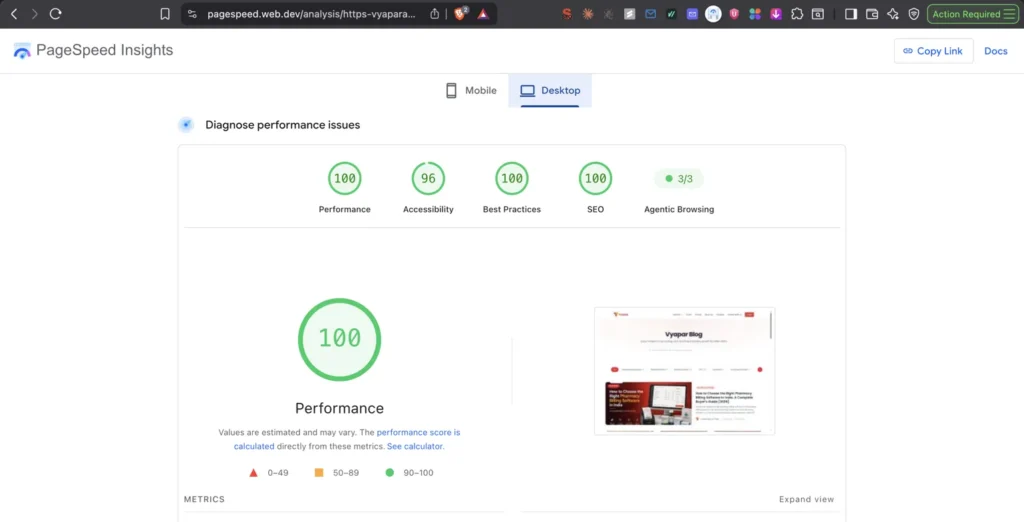
Desktop was better, but mobile is where most of Vyapar’s blog traffic comes from. And mobile was where it was failing.
How This Started#
The team was raising tickets about blog performance frequently. Slow page loads, poor mobile experience, the same complaints showing up again and again. I started tracking the pattern and dug into the root cause. The PSI scores confirmed what the tickets were saying: a 33 Performance score on mobile, 7.8 second LCP. The blog was slow because WordPress was doing too much work on every single page request.
I didn’t file a proposal or write a doc suggesting we should look into it. I built the solution first. I cloned the entire blog on a temporary domain, pulled every post through the WordPress REST API, generated static pages for all of them, and ran PageSpeed Insights against it.
When I brought it to the dev team, their first reaction was skepticism. The blog already has a large number of posts, and as that number keeps growing, any system that has to process all of them will eventually hit the same performance wall. Why go through a migration that won’t scale?
It’s a fair concern if you’re thinking about server-rendered pages. More posts means more database queries, more PHP processing, more load at request time. But with static generation, the number of posts affects build time, not page load speed. A blog with 50 posts and one with 5,000 posts serve individual pages at the same speed because each page is just an HTML file on a CDN.
The proof of concept already had all the posts loaded and showed no performance drop. That killed the scaling argument. The team agreed to move forward.
The Headless Architecture#
In a headless setup, WordPress handles content management and nothing else. The frontend is a completely separate application. During each build, the Next.js app calls the WordPress wp-json REST API once and downloads everything: posts, categories, media references, and RankMath SEO metadata. All of this gets saved as JSON snapshots.
Next.js then uses those snapshots to pre-generate a static HTML page for every single post, category page, and paginated URL. Cloudflare serves these prebuilt pages from the edge. No PHP rendering at request time. No database queries per page load. WordPress is just the backend data source.
New content gets picked up automatically. When someone publishes a post in WordPress, the scheduled CI build runs (also triggers on merges), pulls the latest data, generates fresh static pages, and deploys them.
The Workarounds That Made It Work#
A clean architecture diagram is one thing. Getting it to actually work in production without breaking the editorial workflow is another. Here are the things I had to solve.
WordPress passthrough. The WP admin panel, login pages, wp-json endpoints, post previews, sitemaps, and media still go through WordPress directly. This means authors don’t notice anything changed. They log into the same admin, write in the same editor, preview works, everything feels the same. Only the public-facing blog pages are served as static HTML.
Image URLs stay untouched. I intentionally kept images serving from their existing WordPress/CDN URLs instead of moving them into the Next.js build pipeline. Moving images would mean changing every image URL across hundreds of posts. That’s an image SEO disruption I didn’t want. Google has already indexed those image URLs. Changing them risks losing image search visibility during the transition, even with redirects.
Build reliability. This one bit me during implementation. When the build process calls the WordPress API to fetch all posts, categories, and media data, it’s making a lot of requests. WordPress (and the Cloudflare layer in front of it) will rate-limit you if you hit it too hard during a build.
I built the fetcher to run with limited concurrency, automatic retries on failures, and fallback SEO data. If a specific API call fails even after retries, the build doesn’t break. It uses the last known good SEO data for that post instead of crashing the entire deployment.
The Hosting Cost Situation#
This runs on Cloudflare Workers Static Assets. It’s similar to what Cloudflare Pages offers for static hosting. The static asset delivery is free and unlimited. The Workers Free plan gives you 100,000 Worker requests per day.
For a blog with normal traffic levels, the hosting cost is $0 per month. If you ever need more dynamic/Worker usage, the paid tier starts at $5 per month. That’s it.
The Results#
All comparisons below are mobile-to-mobile, same PageSpeed Insights test conditions.
| Metric | Before (WordPress) | After (Next.js + Cloudflare) |
|---|---|---|
| Performance Score | 33 | 82 |
| LCP | 7.8s | 4.7s |
| FCP | 1.9s | 1.7s |
| Total Blocking Time | – | 0 ms |
| CLS | – | 0 |
| Speed Index | – | 2.5s |
| Accessibility | 89 | 93 |
| Best Practices | 88 | 96 |
| SEO | 100 | 100 |
| Agentic Browsing | 1/3 | 3/3 |
On desktop, the after scores are even cleaner: 100 Performance, 96 Accessibility, 100 Best Practices, 100 SEO, 3/3 Agentic Browsing.
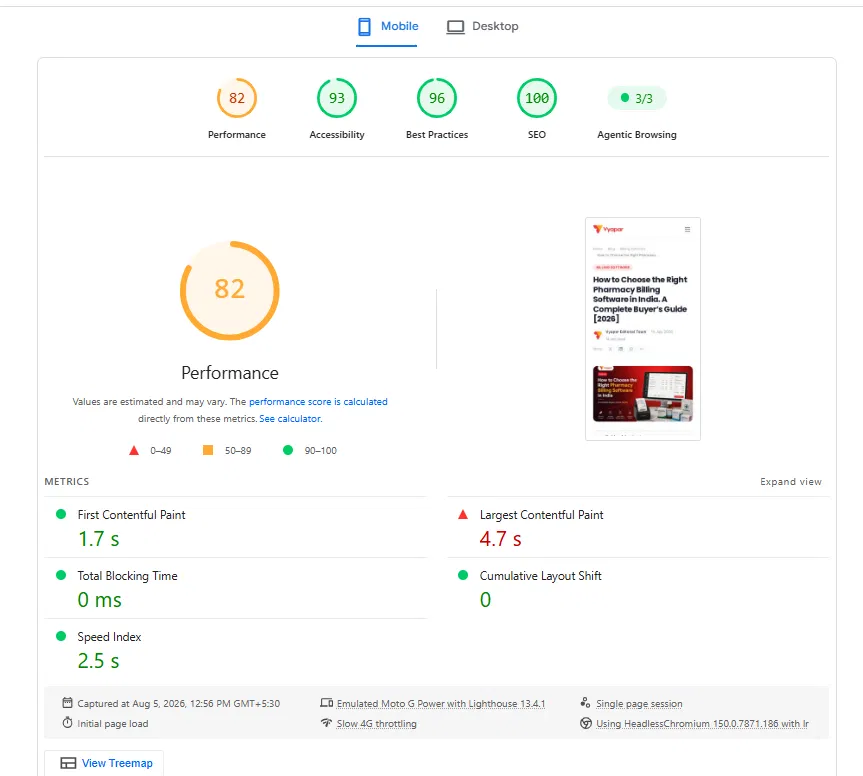
The LCP improvement from 7.8s to 4.7s on mobile is a 40% reduction. Performance score went from red (33) to green-adjacent (82). And the Agentic Browsing score going from 1/3 to 3/3 means Google’s AI agents can actually work with these pages now.
What I’d Watch Out For#
The mobile LCP at 4.7 seconds is still not where I want it. It’s dramatically better than 7.8 seconds, but the target is under 2.5 seconds. The bottleneck now is likely hero images and above-the-fold content loading. That’s the next optimization pass.
The build-time fetching approach also means content updates aren’t instant. There’s a delay between publishing in WordPress and the new static pages going live. For a blog, that’s fine. For time-sensitive content, you’d want to add on-demand revalidation or webhook-triggered builds.
And the WordPress passthrough setup adds complexity. You’re maintaining two systems that need to stay in sync. Sitemaps come from WordPress. Pages come from Next.js. If someone changes the URL structure on one side without updating the other, things break silently.
The Takeaway#
Going headless doesn’t mean abandoning WordPress. It means separating what WordPress is good at (content management) from what it’s bad at (fast frontend delivery). Keep it as the CMS backend, pull content at build time via the REST API, serve static pages from the edge, and let the editorial team keep working the way they always have.
The mobile Performance score went from 33 to 82, LCP dropped by 40%, and hosting costs went to zero. That’s the trade: build pipeline complexity in exchange for a significantly faster, cheaper blog that your team doesn’t need to relearn.
Related Articles

RFC 9309 Explained: The Robots.txt Standard Every SEO Should Actually Read
For nearly 30 years, robots.txt was just a gentleman’s agreement. Martijn Koster proposed it in 1994, everyone adopted it, but no standards body ever formally defined it. There was no official spec for how crawlers should parse the file, what happens when the server returns a 500, or how wildcard matching works. In September 2022, […]
I Migrated a 900-Page Site to a New Domain. Here’s Everything That Broke.
In December 2025, I migrated an entire product site from its own domain to a subdomain under a parent brand. suvit.io became taxone.vyapar.com. 900+ pages. Full rebrand. New DNS, new CDN, new tracking, new Search Console property. Seven months later, the site is recovering and trending upward. But the migration surfaced problems I didn’t expect, […]